Your Homelab Needs a Ticketing System (and Why I Ended Up on Jira Cloud)
On August 17th the GPU in my Blackwell box fell off the PCIe bus. The service was dead for over two hours and nobody noticed till I went to use it that evening. Fixing it took ten days, a burn test, a tip from a stranger on Reddit and four blog posts.
Looking back, there was no single place that had the full record of what I tried and why. Some of it was in the blog drafts, some of it in shell history, and the rest was in my head. The blog posts made it look organised. It wasn’t.
At work I would never run a project like this. Every change has a ticket, every ticket has a history, and six months later you can go back and see why something is the way it is. At home I was just… winging it. So I fixed that.
Why bother, it’s just a homelab
Yeah, I know. It’s one person and a few boxes. But that one person is also the on-call, the architect and the guy who forgets things. A few reasons it has been worth it for me:
It remembers why. Why is that VLAN set up like that? Why is the driver pinned to that version? The answer is usually “something broke and I fixed it at 11pm”. If there is a ticket, the reason is written down next to the fix. If there isn’t, future me gets to rediscover it the hard way.
Ideas stop nagging. I have a long list of “I should really…” things. Move backups to a second provider, try a new model, clean up the reverse proxy config. Before, those just floated around and showed up at random times. Now they go in the backlog and I can forget about them till I actually have a free weekend.
Recurring stuff actually happens. Cert renewals, checking that the backups can actually be restored (not just that they ran), firmware updates on the UniFi gear. These are boring and thus easy to skip. Once they are tickets, they at least stare at me from the board till I do them.
Patterns show up. One crash is bad luck. Three crashes with the same Xid code in a month is a hardware problem. You only see that if each one is written down somewhere you can search.
AI agents work better with tickets. This one I didn’t expect. I wrote about getting atomic PRs out of AI agents and the whole trick was breaking the work into tight tickets first. Turns out the same thing applies to the homelab. An agent with one well scoped ticket does a much better job than an agent with “go fix the NAS”.
The self-hosted options
The homelab answer is obviously to self-host it. I’ll be upfront, I didn’t install any of these. I read up on them, compared what they do and what they need to run, and that was enough to make a call. Quick notes on each, in no particular order:
- Redmine: the old reliable. It has been around forever, does issues, wikis, time tracking, everything. The UI looks like it’s from 2008 because it kind of is. Works fine though.
- OpenProject: much more modern than Redmine and has Gantt charts and boards. Feels built for a team with a project manager. Heavy for one person.
- Plane: probably the closest thing to a self-hosted Jira/Linear. Clean UI, cycles, modules. Needs a few containers (Postgres, Redis, etc.) so not exactly lightweight.
- Taiga: agile focused, nice looking boards. Also a bunch of services to run.
- Gitea / Forgejo issues: if your configs already live in a git forge, the issue tracker is right there. Simple, and the issues sit next to the code they talk about. Weak on anything that isn’t code.
- Vikunja, Kanboard, WeKan: lightweight task and kanban tools. Great if you just want a board and nothing else.
- YouTrack: JetBrains has a self-hosted version that’s free for small teams. Good if you like JetBrains stuff.
- Jira Data Center: Atlassian stopped selling it to new customers in March 2026 and it reaches end of life on March 28, 2029. So not something to start on now.
There are also helpdesk style tools like Zammad and osTicket, but those are built for answering customers, not for tracking your own work.
From what I read, any of the first five would do the job. If you want to self-host, Plane looks like the pick for a polished UI and Redmine for something that will still work in 10 years.
Why I went with Jira Cloud anyway
I self-host a lot of things, so picking a SaaS tool for this felt a bit like cheating at first. But once I saw Jira is free for personal use, it was a no brainer. Every self-hosted option above is one more set of containers to run, update and back up. Jira was free and already familiar, so I didn’t have to think about it any further.
It’s free. The free plan covers up to 10 users and 2 GB of storage. For a homelab that’s about 9 more users than I need, and my tickets are mostly text so the storage isn’t a worry either.
It doesn’t go down with the homelab. The whole point of the tracker is to be useful when things are broken. If my tracker runs on the same box that just lost its GPU, or behind the same network that’s down, then it isn’t there when I need it. Next time something like Xid 79 happens, the notes will be somewhere I can still open from my phone.
I already know it. I use Jira every day at work. JQL, boards, automations, I don’t have to learn anything. For a side project that matters more than features. The tool you already know is the tool you will actually use.
Agents can talk to it. Atlassian runs an official Rovo MCP server, hosted on their side, so Claude can read and update tickets directly with nothing extra for me to run. This post literally started as a ticket, BLOG-2, and when I sat down to write it Claude pulled the ticket, read it, and we started from there. That loop of ticket, agent, PR, ticket closed is the same one I use for code and it works just as well for the homelab and this blog. It’s also why Sandy has Jira as one of its sources.
The mobile app is good. Not great, but good. Enough to file a ticket from the couch when I notice something.
What I don’t love
It’s not all good, so to be fair:
- My homelab notes now live on Atlassian’s servers. For me that’s fine, there are no secrets in tickets (and there shouldn’t be in yours either). If that bothers you, self-host.
- Jira is a lot. Most of the screens and settings are meant for a 200 person org. You have to ignore a lot of it.
- Free plans change. If Atlassian changes the terms tomorrow, I’ll have to move. Exporting is possible but not fun.
- It’s a bit funny to run a homelab and then track it on someone else’s cloud. I’ve made peace with it.
How I have it set up
I only set this up at the end of September, so it’s still young. Funny enough, HOME-1, the very first ticket, was “Setup MCP server access within Claude”. Get the agent wired in first, then everything else.
Right now there are five projects, one per thing I’m working on:
- HOME: the homelab itself.
- BLOG: this blog. Every post starts as a ticket, including this one (BLOG-2).
- SANDY: bugs and fixes for Sandy.
- DECLOG: a decision log app I’m building on the side.
- EX: explorations. Things I want to try that don’t belong anywhere yet. It’s empty right now, which says something about my free time.
I keep the workflow dead simple everywhere: To Do, In Progress, Done. The BLOG project has an extra In Review step for when a post is written and waiting on a final read. Anything more than that and I would stop updating the tickets, which defeats the purpose.
HOME is the most interesting one. It’s a business project, not a software one, and the parent issue type is Workstream instead of Epic. “Epic” sounds like a quarterly roadmap, and my homelab doesn’t have one of those. A workstream is just a bucket of related work. Right now there is one, “The Server Maintenance”, with 13 tasks under it. I didn’t write those tasks myself. I had an agent go through the server and file a ticket for everything that looked off. It created all 13 in about five minutes. A few of them:
- Remove dead OpenClaw nginx config and orphaned SSL files
- Decouple firecrawl from the old openclaw-net Docker network and clean up orphans
- Bring system-notes.md, README.md and CLAUDE.md in line with the live system
- Deploy an intranet-only dashboard (start page) for the server
- (Optional) Friendly hostnames like plex.home.arpa via local DNS
None of these are urgent. All of them are the kind of thing I would have forgotten about by next month. Now they just sit there till I get to them.
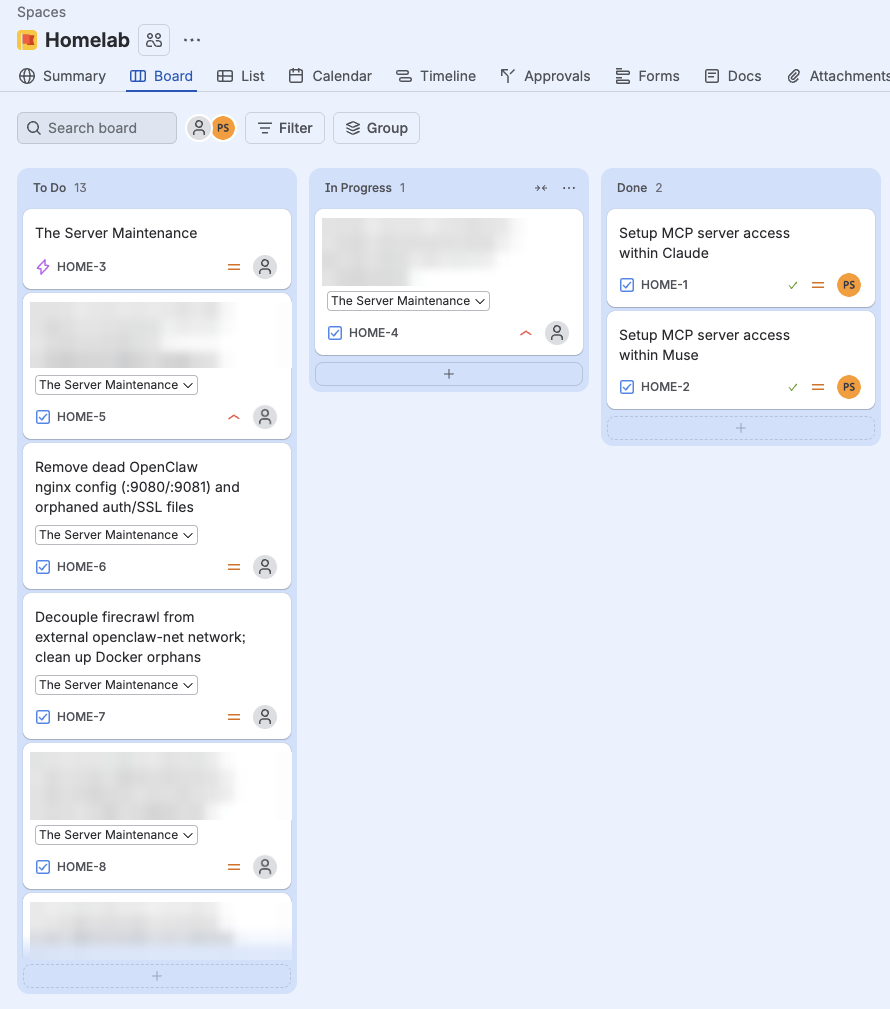
(Yes, a few cards are blurred. Those are security fixes I haven’t finished yet, and I’m not putting them on the internet before they’re done.)
DECLOG is set up more like a real software project, with epics and stories, because it’s an actual app with a spec. Different projects, different amount of process. That’s fine.
If you’re starting out
Don’t overthink the tool. Pick one, any one, and start writing tickets for the next broken thing. The habit matters way more than the software. If you already know Jira from work, the free plan is a pretty easy place to start. If you want everything on your own hardware, try Plane or Redmine on a weekend and see which one you don’t hate.
I just wish I had done this before the GPU fell off the bus :(