Two Weeks With My AI IT Admin
My AI IT admin has been running for two weeks now. So far I haven’t had to stop it from doing something wrong. There was one time I had to step in, but it was because the agent was being too careful, and I had to ask it to go ahead.
That was a cleanup ticket. After a few rounds of updates, the home server and ai-box had old NVIDIA driver packages left over, and hermes-it filed a ticket to remove them. Before asking me, it listed every package it would remove and checked that none of them were part of the driver in use. Even after all that, it was not sure about going ahead, so I asked it to.
I think this is a good thing. It tells me that having the approval check in place, and asking the agent to be careful, is helpful.
Quick recap
Two weeks ago I wrote about hermes-it, a Hermes agent that watches my homelab, files tickets in Jira and can’t change anything till I approve it. It writes the exact commands in a ticket in my HOME project. I add the approved label. Then a small script called it-change checks with Jira that I really approved it, and only then runs those commands on the server or ai-box.
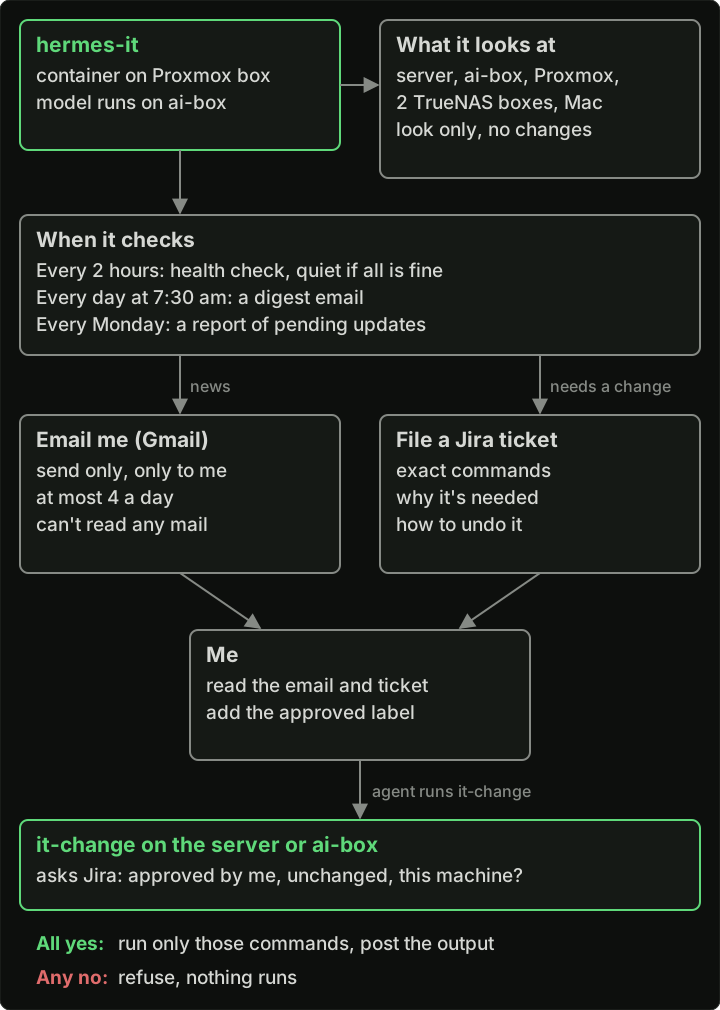
How hermes-it watches my machines, tells me things and makes changes.
At the end of that post I had two doubts. Will I slow everything down, since every change waits for me? And can I tell if the commands I approve are correct? This post is about how that went.
What it ran
The number of tickets went up a lot. In the three weeks before hermes-it started, I filed 3 tickets in HOME. Since it started on October 28th, it has filed 29 on its own.
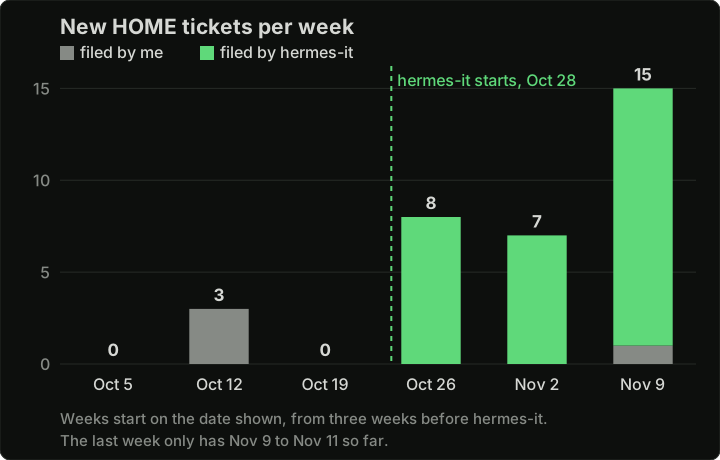
New tickets in my HOME Jira project each week from October 5th, by who filed them.
In these two weeks I approved around twenty tickets. Most of them were simple:
- security and package updates on the server and ai-box, a few times
- a new Linux kernel on both, and the reboot to start using it
- Docker image updates on the server, like Plex and Jellyfin
- updating my Caddy container (my reverse proxy)
- the NVIDIA cleanup above
The Caddy update took more work than it should have. After the first update, Caddy was still running the old version. The agent’s next ticket had the wrong reason for this, and I approved it anyway. That one was stopped before it finished. Then the agent filed a ticket that only looked at the server without changing anything, found the real reason, and the next fix was a single command. In the end it took five tickets for one container. Nothing broke, but I approved a fix that was based on the wrong reason, and the approval check had no way to know that.
Where it helped
The first one is my nightly NAS backup. On November 9th hermes-it filed a ticket saying the backup had failed. Most of the data was copied, over 500 GB, but a few files and three whole folders were skipped. All of them had very long or unusual names. The agent didn’t change anything. It wrote down what it saw and gave me a few options.
The cause was my UNAS Pro (the one from my TrueNAS to UNAS backup post). It has a limit on how long a new file or folder name can be, and some of my names were longer than that. The agent got the main point right, but some details wrong. It said the names had Cyrillic, Greek and Thai letters. They were actually Persian and some special Unicode letters. The fix was too big for one ticket. About 150 names had to be shortened, and the backup script needed changes to handle long names. I did that with Claude Code on the server, and the next backup ran without errors.
The second one is update tickets. The agent files them on its own and says what each update will affect. A recent ticket updated five Docker apps, and for each one it said what would stop for a short time. For example, Plex and Jellyfin streams stop for a few seconds while those apps restart. So before I approve, I know what will happen.
What it missed
After the reboot for the kernel update, Jellyfin on the server started before the network shares were mounted. I found the problem myself and fixed it manually with an agent session on the server.
As far as the approval check is concerned, that reboot went fine. I approved the ticket, nobody changed the commands after that, they ran on the right machine and the server came back up. I saw the same thing in the first post, when vLLM kept restarting and the agent said all was fine. The check makes sure that only the commands I approved run. It does not check that everything works after they run.
My two doubts, two weeks later
Am I slowing things down? Yes. Tickets do wait for me. The Plex update from the first post waited about five days before I approved it. The one thing that did break, Jellyfin starting before the shares after the reboot, I had to fix myself anyway.
Can I tell if the commands are correct? Sometimes. When the ticket explains things well, like the NVIDIA one with its full list of packages, it’s easy. But the Caddy tickets show I can still approve something based on the wrong reason. And the Jellyfin problem wasn’t in the commands at all. It came after them. So I still need to read every ticket carefully, but that alone is not enough.
How I use it now
I don’t create most tickets by hand anymore. I tell Claude in chat what I want, Claude files the ticket in HOME, and hermes-it runs it through the same approval check as everything else. For bigger cleanups, where I need to look around and decide as I go, I use Claude Code on the server directly.
What’s still missing
- The approval check only works on the server and ai-box. Proxmox, the TrueNAS boxes, the backup NAS and my Mac are still manual. When Proxmox had an update last week, hermes-it filed a ticket with the steps and I ran them myself.
- The backup script is not in git. After the fix above, the latest version is only on the server.
I have a ticket for both. Give hermes-it access to every machine, add the approval check where it makes sense, and put the backup script in git.
So most of my job is still adding labels in Jira. And once in a while, telling my IT admin that it’s okay to go ahead.