From a 96 GB PRO 6000 to a 32 GB RTX 5090, Same Model, Same 262K Context
This morning at 08:34 UTC my coding model moved to its third serving engine in three days. It’s the same Qwen3.8-27B that ran on my 96 GB RTX PRO 6000 Blackwell, at the same 262,144-token context, but now on an RTX 5090 with a third of the memory. The 5090 was a spare I had lying around from another gaming build. The PRO 6000 is sold. It went to its new owner on November 21st. Quality is a statistical tie with the old box, and single-request decode is actually faster.
Getting there took two attempts a month apart, one engine that couldn’t do it, one that could but fell over under real use, and one I hadn’t heard of a week ago.
Why sell the bigger card? The 5090 was sitting on a shelf, and I was going to sell one of the two. I got a great offer for the PRO 6000, and I had already heard that a 5090 can run Qwen3.8-27B. So I sold the PRO 6000. If I ever need a lot of memory, I also have a Mac with an M5 Max and 128 GB.
flowchart LR
  A["Jun 2026<br/>PRO 6000 96 GB<br/>vLLM, BF16"] --> B["Oct 13<br/>NVFP4 + MTP<br/>1.6M-token KV pool"]
  B --> C["Oct 27, take 1<br/>5090 + vLLM<br/>stuck at 147K"]
  C -->|"buyer cancelled"| B2["PRO 6000<br/>back in"]
  B2 --> S["Nov 21<br/>PRO 6000 sold<br/>to a new buyer"]
  S --> D["Nov 21, take 2<br/>5090 + llama.cpp<br/>262K"]
  style S stroke-dasharray: 5 5
  D --> E["Nov 22<br/>overflow fix +<br/>quality bench: tie"]
  E --> F["Nov 23<br/>5090 + NInfer<br/>262K, 377K pool"]
Where I started
The PRO 6000 setup is the one from Building a Local LLM Server on Blackwell. By October it was serving Qwen3.8-27B in NVFP4 with MTP speculative decoding, after a benchmark showed NVFP4 was as good as BF16. With 96 GB the KV cache pool held 1.6 million tokens, so six full 262K contexts fit at once. Memory was simply not a thing I thought about.
Everything in front of the engine is a small stack that I didn’t want to touch, because OpenCode, Claude Code and my agents are all pointed at it and configured for 262K:
flowchart LR
  C["OpenCode, Claude Code,<br/>Hermes agents"] -->|"OpenAI + Anthropic APIs"| SF["stream-filter :4000"]
  SF --> LL["LiteLLM"]
  LL --> E["engine :8000<br/>served as qwen3.8-27b"]
  E --> G["GPU"]
  style E stroke-dasharray: 5 5
The dashed box is the only thing that changed in this whole story. Same port, same served model name. The clients never knew.
Both cards are the same GB202 die (SM120) with the same 1.79 TB/s memory bandwidth. The 5090 has 170 SMs instead of 188 and 32 GB instead of 96. So decode speed should be about the same, and the real question was always memory.
Take 1 (October): vLLM on 32 GB
The first buyer showed up in October, so on the 27th I swapped the cards and tried to keep everything as it was: vLLM, the NVFP4 checkpoint, FP8 KV cache, vision on.
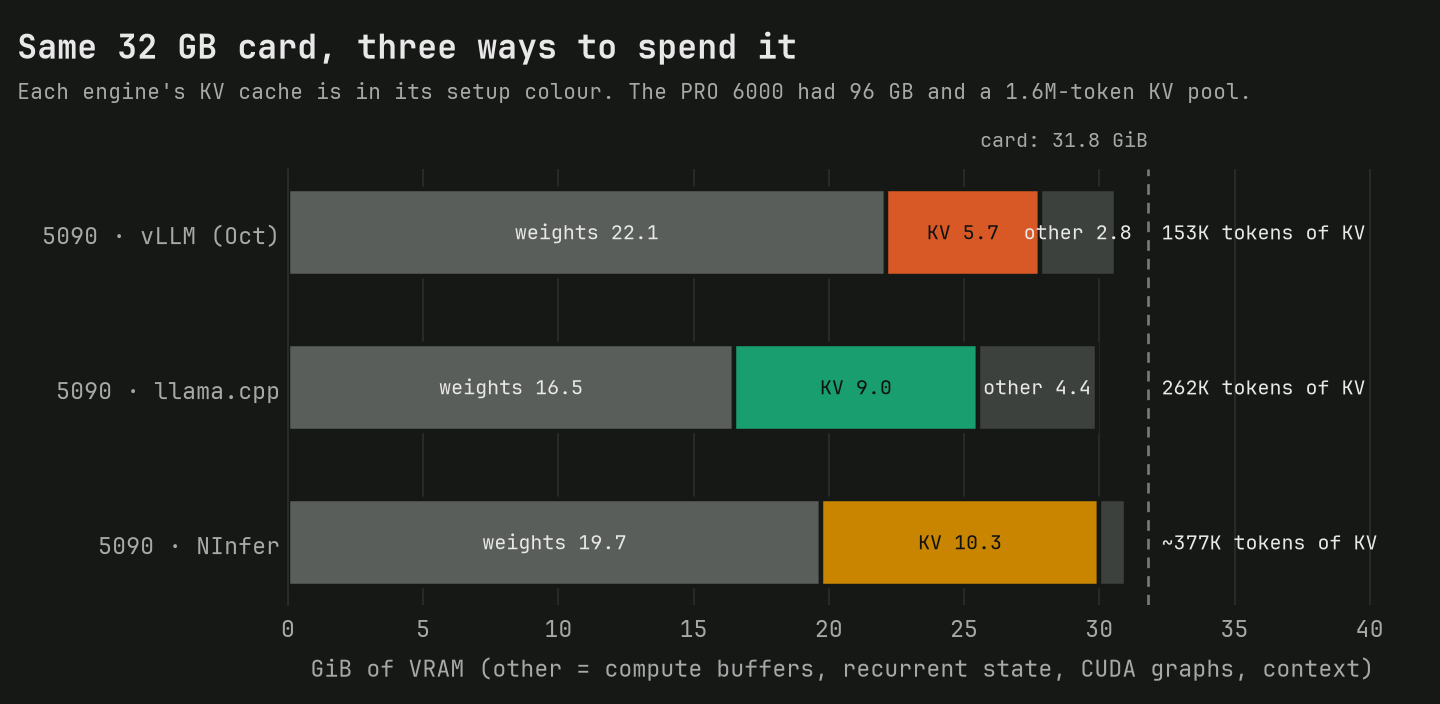
The weights alone are 22.1 GiB. After weights, activations and CUDA graphs, there was 5.7 GiB left for KV cache, which is 153K tokens. A 262K context at FP8 needs about 9.8 GiB. I was 4 GiB short.
Getting even to 147K took some squeezing: --gpu-memory-utilization 0.96, --max-num-seqs 8 (the PRO 6000 had 480), and VLLM_MEMORY_PROFILER_ESTIMATE_CUDAGRAPHS=0, because vLLM reserved 0.7 GiB for CUDA graphs that actually used 0.19.
Then I went through every smaller KV format vLLM 0.31 offered:
flowchart TD
  S["Need 262K in ~5.7 GiB of KV"] --> N["nvfp4 KV"]
  S --> I["int4_per_token_head"]
  S --> T["turboquant_4bit_nc"]
  S --> K["turboquant_k8v4"]
  S --> F["fp8 at 147K"]
  N -->|"no attention backend on SM120"| X1["won't start"]
  I -->|"fits 262K, but 6 tok/s at 200K"| X2["too slow"]
  T -->|"OOM at 110K, or garbage output"| X3["broken"]
  K -->|"needs 7.1 GiB"| X4["doesn't fit"]
  F -->|"107 to 96 tok/s, needles 5/5"| OK["shipped at 147K"]
TurboQuant was the sneaky one. At 0.92 utilization it ran fine and benchmarked as the fastest option. Then I actually read its output: “Paris” followed by *(*(*(*( forever. The speed benchmark used ignore_eos, so it never noticed. Lesson learned, always pair a speed test with a correctness check.
So 147K was the ceiling. Then the buyer cancelled, the PRO 6000 went back in the same evening, and I wrote everything up so I wouldn’t have to redo it.
Take 2 (November 21): find the 4 GiB
Then a second buyer came along, and this time the sale went through: the PRO 6000 was sold on November 21st. So the 5090 had to work for real, with no card to fall back to. Two things were different this time. I decided I don’t need vision on this box (it’s coding only), and I stopped caring which engine serves the model.
Going back over the October memory numbers, the interesting part was what’s inside those 22.1 GiB:
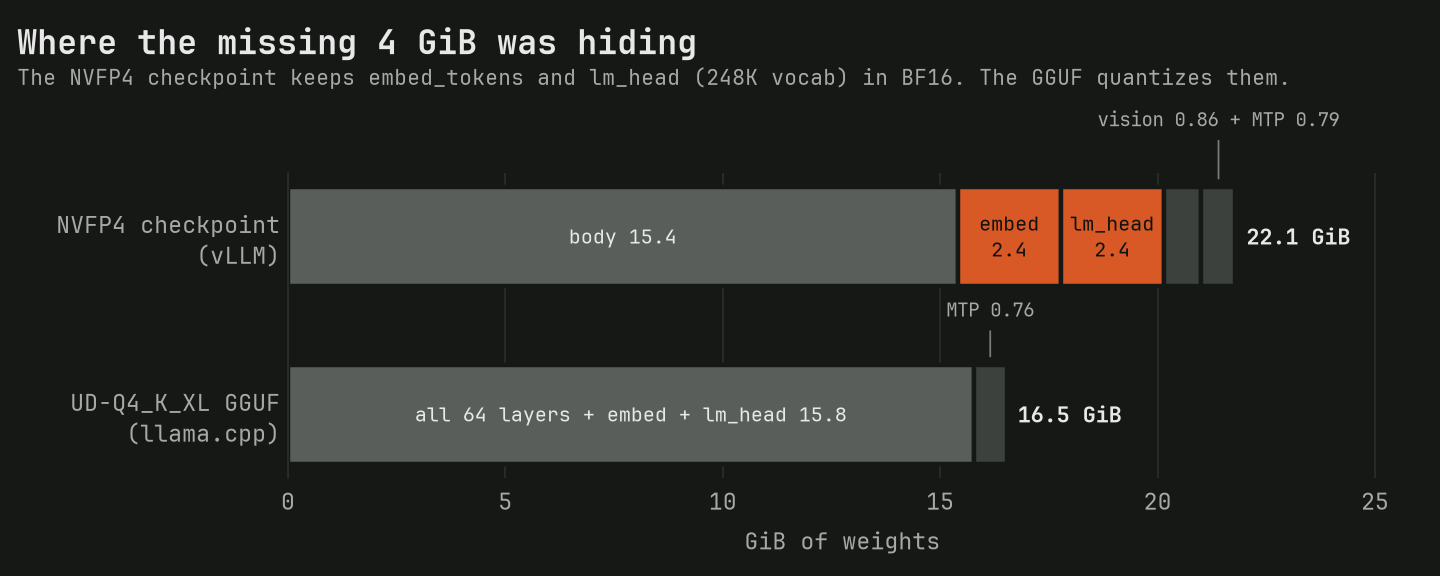
Qwen3.8 has a 248K-token vocabulary, and the NVFP4 checkpoint keeps both the embedding table and the output head in BF16. That’s 4.7 GiB in two tensors. Unsloth’s UD-Q4_K_XL GGUF quantizes those too, so the whole model drops to 16.1 GiB, plus 0.76 GiB for the MTP draft head. That’s the 4 GiB, more or less exactly.
The other half of the math is the KV cache. Qwen3.8 is a hybrid: only 16 of its 64 layers are full attention, the other 48 are Gated DeltaNet with a small fixed recurrent state. So a token of KV is only 16 layers × 4 KV heads × 256 dims, K and V. At q8_0 that’s 34.8 KB per token, and 262K tokens is 8.5 GiB.
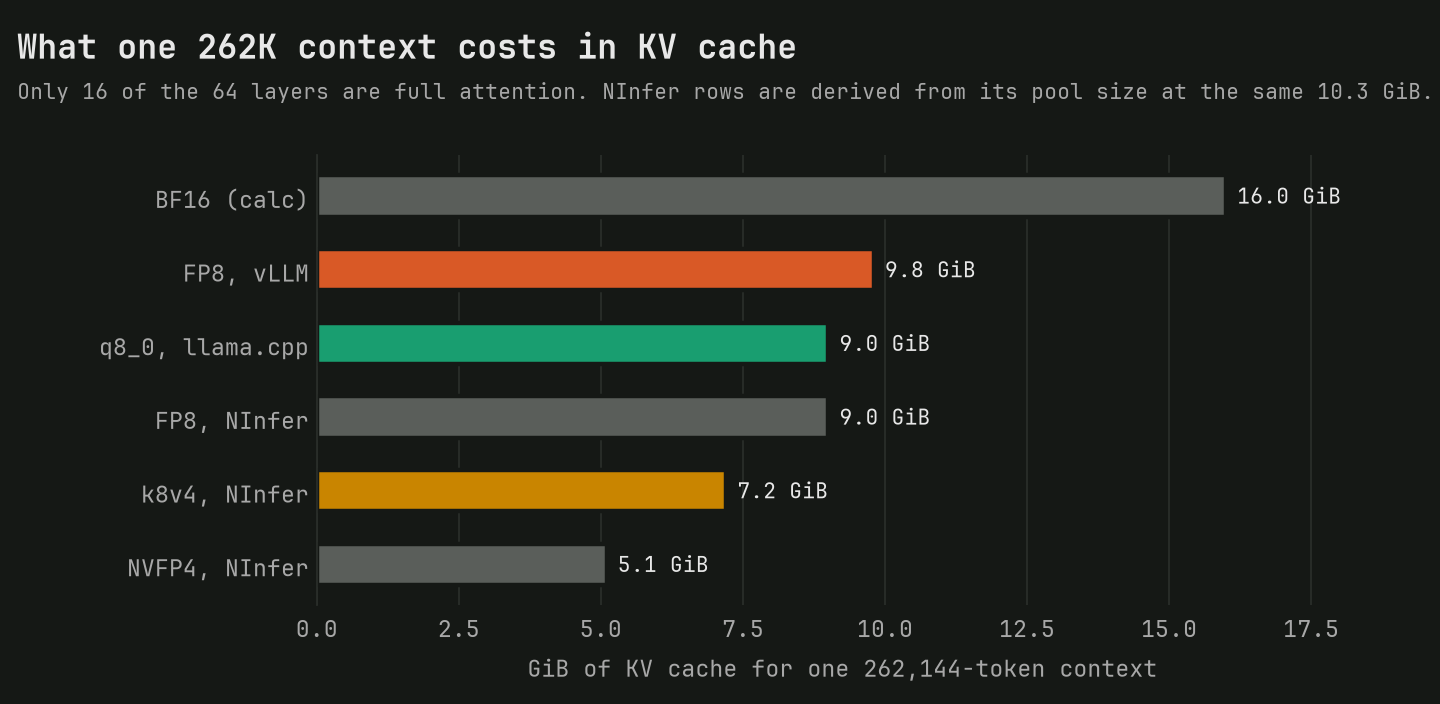
16.5 + 9 = 25.5 GiB, which leaves room on a 31.8 GiB card. On paper.
The first try didn’t fit
I tested the llama.cpp config on the PRO 6000 before the swap, and it used 32,568 MiB. The 5090 has 32,607. Weights and KV were exactly as predicted. The surprise was the compute buffers: they scale with micro-batch size × vocab, and with a 248K vocab that adds up fast. The MTP draft model inherited the same 2048 micro-batch, so I was paying for it twice.
-ub 1024 for the main model and --spec-draft-n-ubatch 256 for the draft fixed it. Idle at 30.6 GB, peak 30.7 GB on a 258K-token request.
The final llama-server flags, minus paths:
llama-server -m Qwen3.8-27B-UD-Q4_K_XL.gguf \
  --spec-type draft-mtp --model-draft mtp-Qwen3.8-27B-Q4_0.gguf --spec-draft-n-max 2 \
  --cache-type-k q8_0 --cache-type-v q8_0 \
  --ctx-size 262144 --parallel 2 --kv-unified \
  -b 2048 -ub 1024 --spec-draft-n-ubatch 256 \
  --alias qwen3.8-27b --port 8000
262K on a 5090. The PRO 6000 went off to its new owner the same day, and I was pretty pleased with myself. For about a day.
What broke once real work hit it
Two sessions, one pool
--parallel 2 --kv-unified gives two slots that share one 262K pool. That’s fine till two agent sessions both get long. At 10:27 on the 22nd, slot 0 held 195K tokens and slot 1 was prefilling 68K. Total 263,878. llama-server’s answer was to kill both requests.
sequenceDiagram
  participant A as Agent session A
  participant B as Agent session B
  participant L as llama-server (one 262K pool)
  A->>L: turn with 195K history
  Note over L: slot 0 holds 195K
  B->>L: turn with 68K history
  Note over L: 195K + 68K = 263,878 > 262,144
  L-->>A: error: Context size has been exceeded
  L-->>B: error: Context size has been exceeded
  Note over A,B: both retry, both fill the pool again
In 22 hours that was 64 failed requests and 1,449 “KV full” retry warnings. The fix was --parallel 1. Every request gets the full 262K, and a second one waits in line instead of failing.
Waiting in line is slow
Waiting has its own problem. The next morning OpenCode started failing with Timed out waiting for response headers. Here’s the chain:
sequenceDiagram
  participant O as OpenCode
  participant S as stream-filter
  participant L as llama-server (1 slot)
  O->>S: turn, 166K history
  S->>L: forward (buffers the whole reply)
  Note over L: busy with the other session's turn
  Note over L: then re-prefills 166K (~80 s),<br/>the 8 GiB prompt cache held only one session
  Note over O: 300 s default timeout
  O--xS: gives up, retries in 5 min
  Note over L: abandoned request still holds the slot
Three fixes: OpenCode’s provider timeout to 1800 s, stream-filter’s upstream timeout to 1800 s, and --cache-ram 24576 so both sessions stay in llama.cpp’s host prompt cache and switching between them skips the 80 second prefill. That worked. But I was now tuning around the engine instead of using it.
Is the GGUF as good?
The other open question was quality. In October I’d only benchmarked the GGUFs on speed, so the night of the 22nd I ran the full llm-bench suite against production llama.cpp. Same prompts, seeds and budgets as the October NVFP4 run.
Every suite was a statistical tie. The only p-value under 0.05 was LiveCodeBench medium, where the GGUF was better (8 problems only it solved vs 1), and with 10 comparisons that’s most likely noise. So the 4-bit K-quant cost nothing I could measure. You can see it in the three-way chart further down.
Take 2.5 (November 23): NInfer
That left serving behaviour as the weak spot: one request at a time, slow prefill, and a hard failure mode when memory runs out. So I tried NInfer, a native C++/CUDA engine that supports a short list of models on the RTX 5090 and DGX Spark. Qwen3.8-27B is one of them. It ships its own NVFP4 build of the model and has a KV format that worked where vLLM’s didn’t: k8v4, 8-bit keys and 4-bit values.
I’d heard about it from some folks I was discussing performance with, and this felt like the right time to actually try it.
I tested three KV formats with 2 lanes and a 262K max context:
| KV format | KV pool | Needles 120K / 250K / 258K | 8 coding tasks | Two cold prompts at once (200K + 180K) |
|---|---|---|---|---|
| fp8 | ~300K tokens | 5/5 each | 6/8 | 272–290 s, one paused and replayed |
| nvfp4 | ~532K tokens | 5/5 each | 7/8 | 243–257 s |
| k8v4 | ~377K tokens | 5/5 each | 8/8 | 86–89 s |
| llama.cpp q8_0 | 262K shared | 5/5 each | 6/8 | both requests killed |
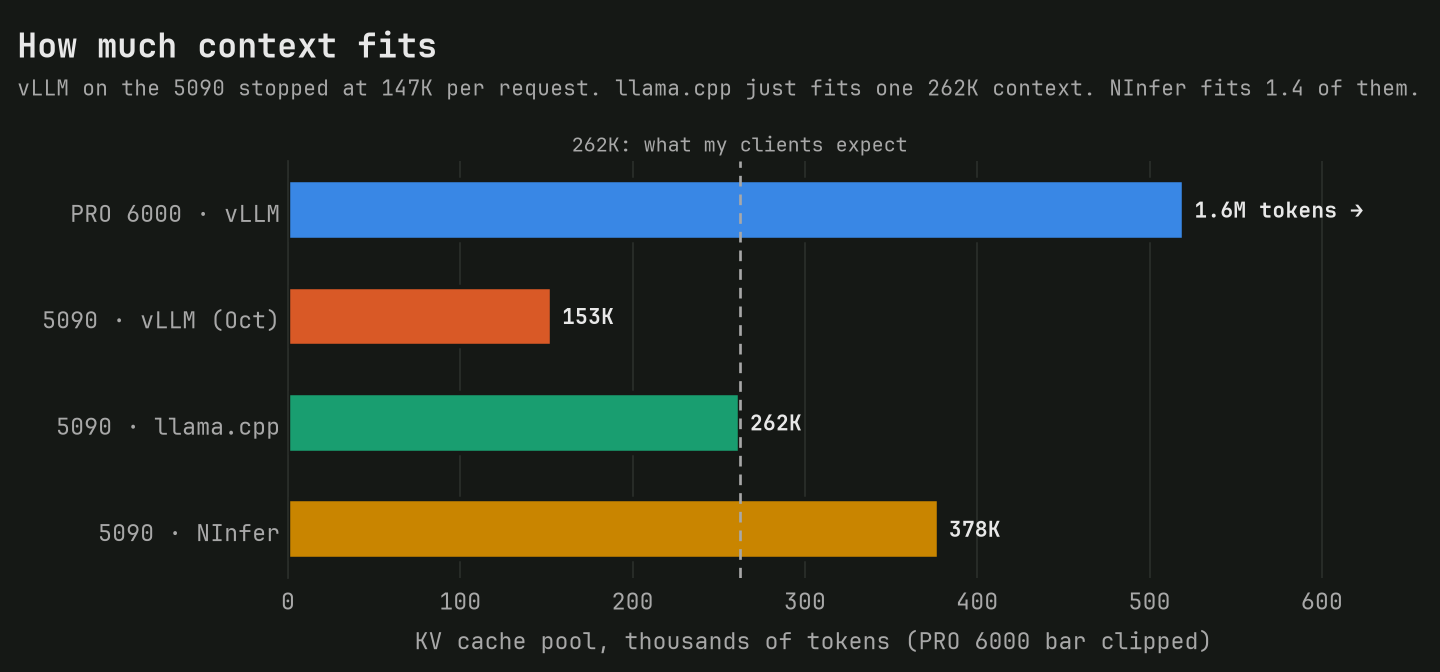
k8v4 was the clear pick. Weights are bigger than the GGUF (19.7 GiB), but the KV is cheaper per token, so the pool ends up at 377K tokens, about 1.4 full contexts:
The part I like most is what happens when memory does run out. Instead of killing requests, NInfer pauses one, lets the other finish, and replays it:
sequenceDiagram
  participant A as Session A (200K)
  participant B as Session B (180K)
  participant N as NInfer (377K pool, 2 lanes)
  A->>N: cold prompt
  B->>N: cold prompt
  Note over N: 380K > 377K
  N->>N: pause B, keep A going
  N-->>A: answer
  N->>N: replay B
  N-->>B: answer
  Note over A,B: both succeed, 86–89 s total
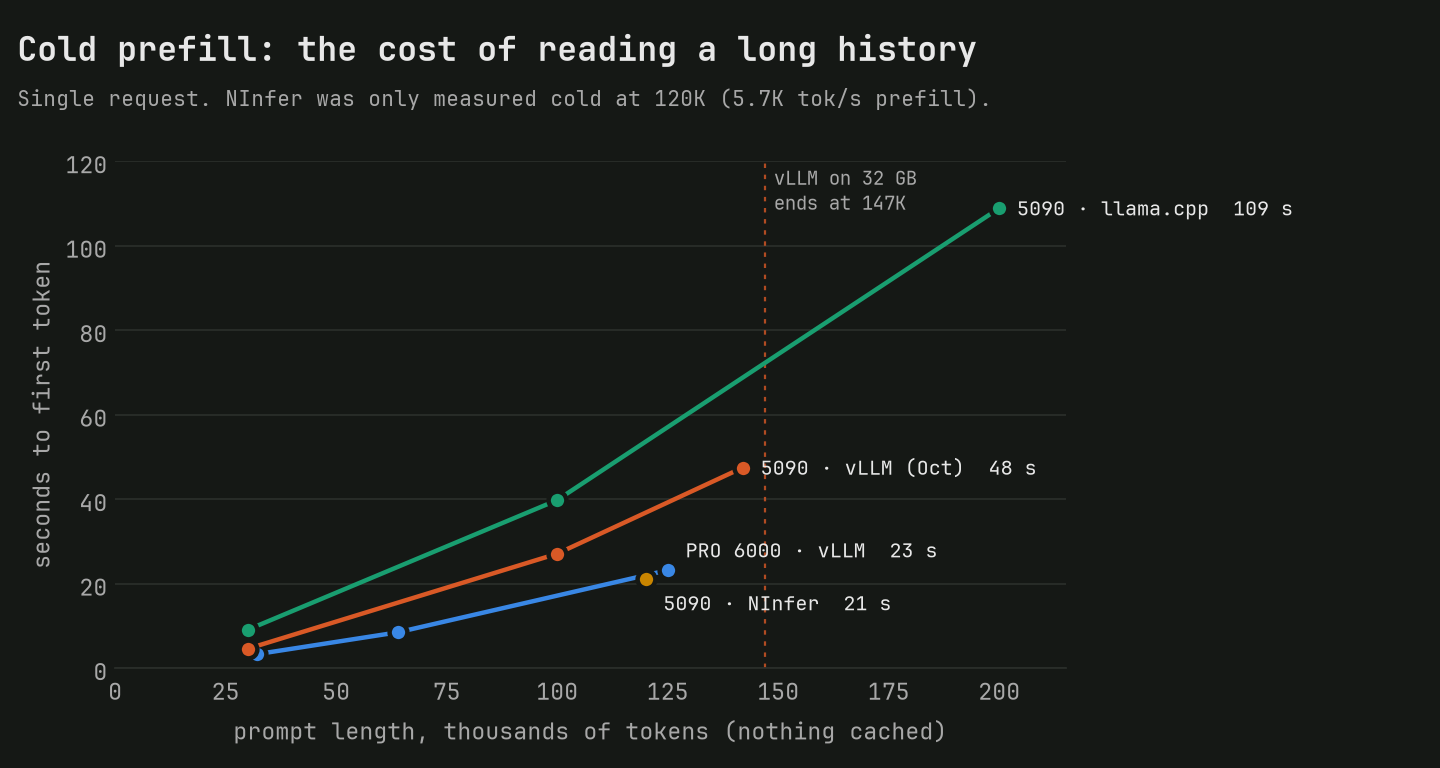
It’s also quicker at reading long prompts. A cold 120K prompt took 21 seconds, which is about what the PRO 6000 managed with vLLM and less than half of what llama.cpp needs:
Then the same quality suite, a third time:
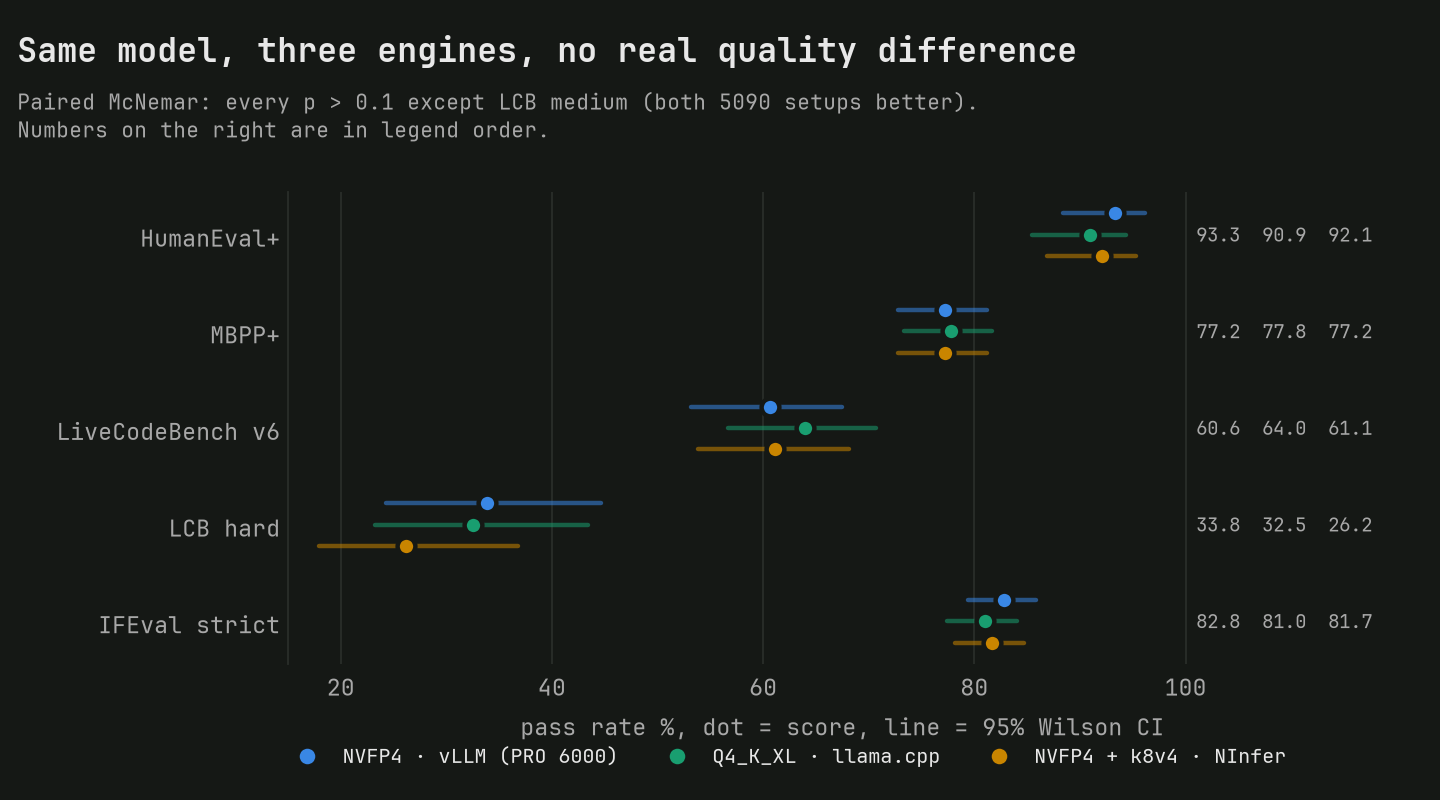
Another tie. LCB hard is the one that looks worse for NInfer (26.2 vs 33.8), but that’s 9 vs 3 problems out of 80 and p = 0.15. The spec-writing suite had a real wrinkle though: 3 of 18 specs hit the 24K thinking budget before finishing and failed their rule checks. A rerun had 1 of 18. Neither baseline ever did that. Every spec that finished passed every rule, so I read it as a mild tendency to think longer, not broken output. I’m watching it.
Production cut over at 08:34 this morning. Startup is 14 seconds, VRAM sits at 31.6 GB, and after a kill -9 systemd has it serving again in 21 seconds. llama-server is still on disk as the rollback, one systemctl command away.
NInfer gotchas
--pending-timeoutdefaults to 30 seconds. A request that waits longer than that for a lane gets an HTTP 503. My first benchmark pass lost a bunch of requests to it. Production runs with1800s(and it only takesmsors,30mis rejected).- A bigger host cache made things slower.
--host-cache-capacity 24GiBmade two concurrent prefills three times slower, with the host thread pegged at 85–91%. The default (9.15 GiB) is fine. - Field names. NInfer returns
reasoning_content, and my stream-filter renames it toreasoning. Not a problem, but it made one API check look like a failure.
Where it ended up
| PRO 6000 + vLLM | 5090 + vLLM (Oct) | 5090 + llama.cpp | 5090 + NInfer | |
|---|---|---|---|---|
| VRAM | 96 GB | 32 GB | 32 GB | 32 GB |
| Max context per request | 262K | 147K | 262K | 262K |
| KV pool | 1.6M tokens | 153K | 262K | ~377K |
| Weights | 22.1 GiB | 22.1 GiB | 16.5 GiB | 19.7 GiB |
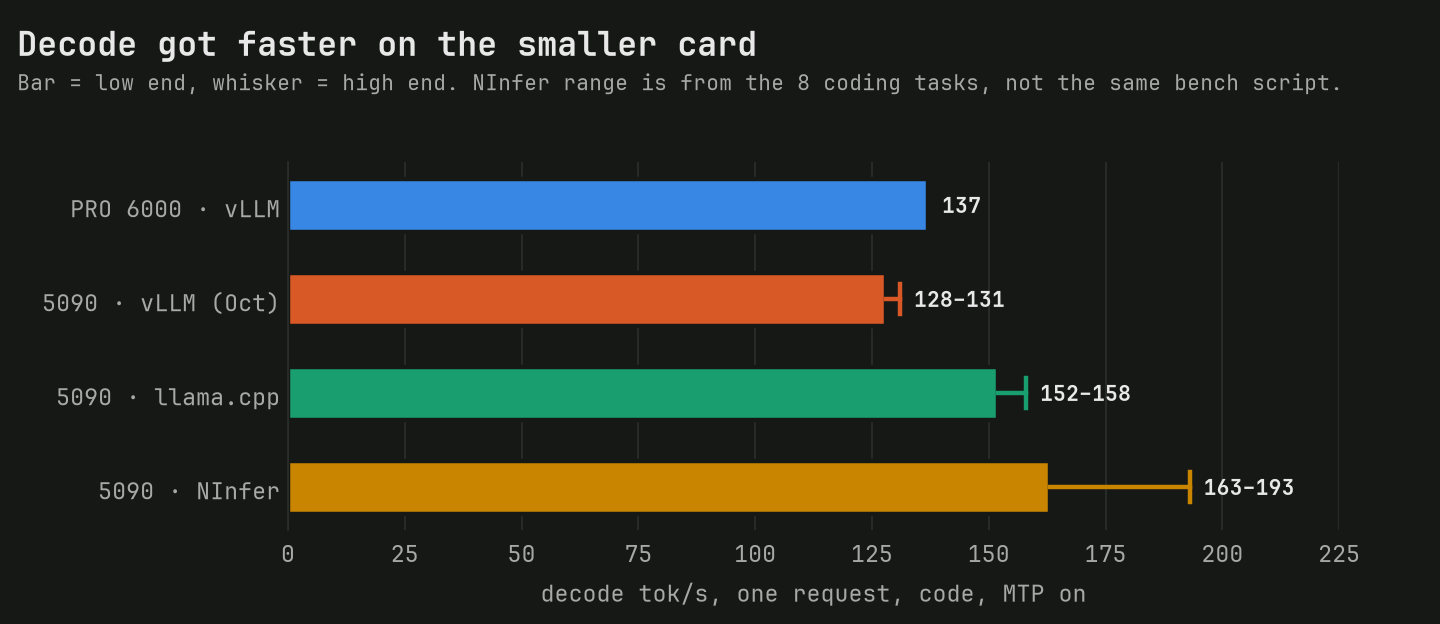
| Code decode, 1 request | 137 tok/s | 128–131 | 152–158 | 163–193* |
| Cold prefill, ~120K | 23 s | ~37 s† | ~54 s† | 21 s |
| Two long sessions | fine | thrash | fail, then queue | pause + replay |
| Vision | yes | yes | off | off (supported) |
* From the 8 coding tasks, not the same bench script as the others. † Interpolated between the measured 100K and 142K/200K points.
What I don’t love
- Concurrency is gone. The PRO 6000 peaked around 1,000 tok/s across 64 requests. The 5090 runs 2 lanes. For one person and a couple of agents that’s fine, but the full benchmark suite now takes 1.6 hours instead of 36 minutes.
- No vision. I turned it off to save memory. NInfer can do it, it just costs VRAM I’d rather spend on context. So far I haven’t missed it.
- I’m on a much smaller engine. vLLM has a huge community behind it. NInfer started in June and supports four model families. If it doesn’t keep up with whatever model I want next, I’m back to llama.cpp, which is why llama.cpp is still installed and one command away.
- The longer-thinking spec thing. Probably nothing. Still watching it.
Day to day, it feels the same as before. I’m pretty happy with it for the things I use it for.
The funny part is that vLLM’s missing piece in October was an nvfp4 KV backend for SM120. As of vLLM 0.34 that PR got closed without merging. If it ever lands I’ll run the bench again, because that’s now one command and an hour and a half of GPU time. Till then, a gaming card is doing the job of a workstation card, and nobody pointed at port 4000 has noticed.